


OK, this may be a somewhat esoteric subject for researchers who mainly work with Twitter data from specific countries and cultures, but over the past few weeks I’ve been working on a paper that analyses Twitter activities in the #egypt and #libya hashtags – and as part of that work, I’ve been interested in exploring the interactions between users tweeting in Arabic and users tweeting in other languages (mainly in English). Unfortunately, there’s no reliable means of identifying the language of specific tweets, or of the users who post them; while the Twitter API provides an ISO language code (e.g. ‘en’ for English, ‘no’ for Norwegian, etc.) for each tweet, this is drawn simply from the overall language setting of the user’s account, and not specific to each individual tweet itself. For users who alternate between languages in their tweeting, all tweets will be tagged with their chosen language code; for users who haven’t bothered to change their Twitter profile settings away from the default English, all their tweets will be tagged ‘en’, regardless of their actual language.
So far, so unhelpful. Further, short of running every tweet through some form of automatic language recognition tool (using Google Translate or a similar mechanism, for example) – which would be extremely time-consuming for Twitter archives upwards of a few thousand tweets – it is prohibitively difficult to identify the exact language of each tweet, not least also because of the 140 character limit of tweets. In theory, if we had word corpora for all major languages, we could cross-check each tweet against those corpora to see what words from what language occur most frequently – but again, that process would be extremely time-consuming, and would probably have serious difficulties with the abbreviations and contractions which Twitter users commonly employ to stay within that limit.
A much simpler approach – which does generate somewhat less conclusive results, though – works by examining the character sets used in tweets. This is able to make only relatively broad distinctions, but it’s good enough for what I’m trying to achieve with my #egypt/#libya datasets: here, a quick qualitative look at the data suggests that the major division is between Arabic tweets and tweets in English (and to some extent in other European languages) – so the main challenge is to distinguish between Latin and Arabic character sets. This we can do, even just with a basic Gawk script.
Twitter datasets as they are generated by our standard hashtag tracking solution, yourTwapperkeeper, are available in UTF-8 encoding, leaving virtually all characters and character sets intact. Each character is assigned a specific character code, and for historical reasons, the basic characters of the Latin script (unaccented letters, standard punctuation marks, etc.) retain their traditional ASCII codes, with values below 128; beyond that range, we’re moving into accented letters, more unusual punctuation marks, and non-Latin character sets. Sadly, our preferred tool for processing yourTwapperkeeper datasets, Gawk, doesn’t cope all that well with advanced UTF-8 characters – it copes fine with single-byte character codes (i.e. below 256), but not with multi-byte character codes (above 255; it reads these as multiple single-byte characters). At least on a Windows PC, there doesn’t seem to be any way to change that behaviour, either.
However, that’s still good enough for our immediate purpose of distinguishing between Latin and non-Latin (i.e. mainly English and Arabic) tweets. As it turns out, Gawk consistently sees Arabic characters as a sequence of two codes: of either 216 (Ø) or 217 (Ù), followed by another character with a code above 127. So, for a basic distinction between tweets using Latin and tweets using non-Latin scripts, we simply need to count the number of high-ASCII characters (with a code above 127) which Gawk sees in each tweet, and to set a threshold below which a tweet is still classified as ‘Latin’ (to allow tweets that use accented characters or ‘fancy’ quotation marks to be classed as Latin). Through trial and error, I’ve found that a threshold of 20 (i.e. ten Arabic or other non-Latin characters) seems to work reasonably well: few tweets in languages using the Latin alphabet will be miscounted as ‘non-Latin’, even if they contain a number of umlauts or accented characters, while tweets in Arabic, Hebrew, Greek, Chinese, Korean, and other non-Latin alphabets are reliably recognised.
We could use this to mark up the language of every line in a yourTwapperkeeper archive – but that’s not necessarily very useful or interesting. Instead, the script below operates on a user-by-user basis: for each user, it counts the number of their tweets which were above the ‘non-Latin’ threshold, and also calculates a language_ratio value: the percentage of their tweets which used non-Latin characters. The script accepts an optional ‘tolerance’ parameter, to set the ‘non-Latin’ threshold: a typical way to use it would be
gawk -F , -f userlanguage.awk tolerance=20 input.csv >output.csv
(tolerance defaults to zero if it isn’t set).
# userlanguage.awk - Extract stats on the language use of each user, as metrics for network visualisation in Gephi
#
# this script takes a Twapperkeeper CSV/TSV archive of tweets, and calculates for each user a ratio
# indicating how many of their tweets were in non-Latin charactersets
#
# output is in a format ready to be imported as a node list into the Gephi Data Laboratory
# on import, note that new data columns must be imported as 'float' type
#
# the script skips the first line, expecting that it contains header information
#
# script expects an optional numerical "tolerance" parameter, to set how many high-ASCII (non-Latin) characters a tweet may contain while still counted as Latin script
# set tolerance to ~20 to treat most accented European languages as Latin (note that Gawk will count some UTF-8 characters as two or more high-ASCII characters)
# default value for tolerance is 0
#
# expected data format:
# text,to_user_id,from_user,id,from_user_id,iso_language_code,source,profile_image_url,geo_type,geo_coordinates_0,geo_coordinates_1,created_at,time
#
# output format:
# nodes,id,label,user_tweets,user_highASCII_tweets,language_ratio
# (language_ratio is a value between 1 = no Latin tweets and 0 = 100% Latin tweets)
#
# Released under Creative Commons (BY, NC, SA) by Axel Bruns - a.bruns@qut.edu.au

BEGIN {
	getline

	if(!tolerance) tolerance = 0;						# highASCII tolerance level: default 0

	for(char = 0; char < 256; char++) {
		charnum[sprintf("%c", char)] = char
	}

	print "Nodes" FS "Id" FS "Label" FS "user_tweets" FS "user_highASCII_tweets" FS "language_ratio"
}

{
	nodename[tolower($3)] = $3
	node[tolower($3),"tweets"]++

	highASCII = 0
	for(char = 1; char<=length($1); char++) {
		if(charnum[substr($1, char, 1)] > 127) highASCII++		# count number of high ASCII (>127) characters in tweet; note: some UTF-8 characters count as multiples
	}
	if(highASCII > tolerance) node[tolower($3),"highASCII"]++
}

END {
	for(name in nodename) {
		print name FS name FS nodename[name] FS node[name,"tweets"] FS node[name,"highASCII"] FS node[name,"highASCII"] / node[name,"tweets"]
	}
}
The resulting data can be used in a number of ways. For one, we might divide the total userbase into three groups: users who mainly used Latin characters (with a language_ratio below 0.33); users who mainly used non-Latin characters (language_ratio > 0.66); and users posting in a mix of languages (language_ratio between 0.33 and 0.66). If we further combine this grouping with the distinctions between lead users, highly active users, and less active users which the metrify.awk script makes possible, we now have the ability to examine the prevalence of different languages across these different groups – for #egypt during February 2011, this is what results, for example:
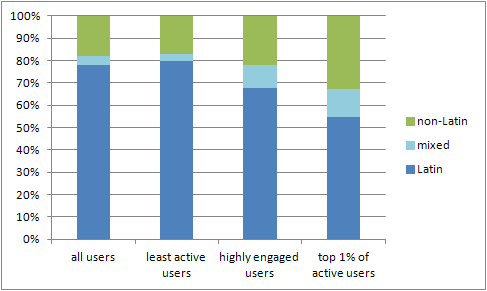
An interesting result: while ‘Latin’ (in this case, mainly English-speaking) users dominate overall, they’re mainly found amongst the less engaged 90% of users – they’re making or retweeting a small number of hashtagged comments about the situation in Egypt during February. The most engaged one per cent of users contain a much larger percentage of Arabic (i.e. non-Latin) speakers, as well as a sizeable proportion of users tweeting in a mix of languages and character sets.
(Note: of course, speakers of languages such as Chinese, Korean, Japanese, Greek, Hebrew, Russian, etc. will be included in the ‘non-Latin’ group here, and speakers of many European languages other than English will be counted amongst the ‘Latin’ group. In many cases, this will be a problem, and our approach here doesn’t allow for easy distinctions between, say, English and French, or Arabic and Hebrew. For our present purposes, however, that’s a negligible problem – few ‘non-Latin’ languages other than Arabic, and few ‘Latin’ languages other than English, are present in the #egypt dataset to any significant extent.)
Additionally, the output of userlanguage.awk is also designed to be easily imported into Gephi as an additional source of data on the users in the network. Assuming we’ve already created a network (for example showing @replies and retweets) for your dataset, using the Twitter usernames (normalised to lower case) as node IDs, we can now use the Data Laboratory to import the language data into the nodes table, as additional columns. Here, it’s important to make sure the numerical metrics generated by userlanguage.awk (user_tweets, user_highASCII_tweets, language_ratio) are imported as columns of the ‘Float’ type, in order to be able to use them effectively in Gephi.
(I’ll say much more about importing Twitter metrics data into Gephi in a future blog post – stay tuned.)
Once imported, these metrics are now available to be used for various purposes: as a means of sizing or colouring nodes in the network, or as criteria for filtering it. To finish off for now, here’s a simple example, which shows @replies and retweets in the #egypt hashtag during February 2011. I’ve used the language_ratio value as the guide for the colour scale here: blue indicates a language_ratio close to zero (predominantly tweeting in Latin characters); green a language_ratio close to one (predominantly tweeting in non-Latin characters); with a gradient of colours between them. Connections between users are coloured according to the language ratio of the sender. (Full graph here – PNG, 9 MB.)
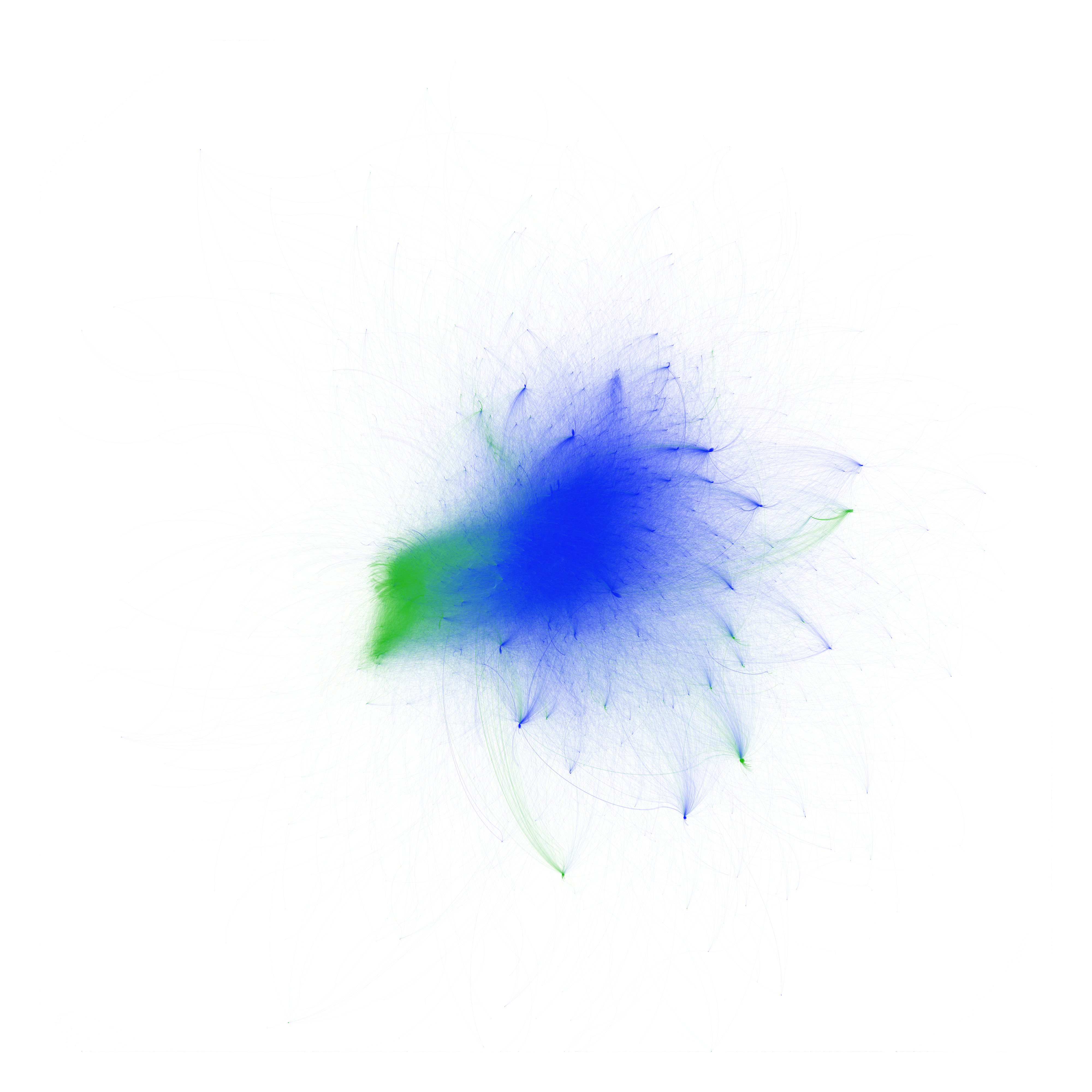
There’s an obvious language divide here – English- and Arabic-speaking users are mainly tweeting amongst themselves. But there are also a good number of connections across the divide – and for these, given the graph above, the most active #egypt participants are disproportionately responsible: mixed-language users are much more likely to be found in that group than in any of the others.
And that’s it for now – more on my language analysis of #egypt and #libya when the paper gets published, and more on using Twitter metrics in Gephi in a future post!
Hey!
Just an idea, Why not use Google Translation API to detect the language of text strings (non-free service):
http://code.google.com/apis/language/translate/v2/using_rest.html#detect-language
—
Janne
Hi Janne,
thanks for this. Yes, good idea in principle – but probably impractical for many of the datasets we’re dealing with. My #egypt dataset, for example, contained some 7.5 million tweets… I know you can bundle requests (to detect the language for up to 5kB of data at a time), but assuming each tweet is 140 characters in length, that’s still 7.5m x 140 characters / 5kB = ~200,000 requests, if my maths is right ! And then, as you note, there’s the fact that the Google Translate API service is no longer free…
Part of the problem is trying to detect the language once a large dataset has been gathered – that’s time-consuming and (if we’re using a external API to do it) very network-intensive. It would be great to do it already as the original dataset is gathered (and it would be even better if Twitter itself did it and delivered a reliable language code as part of the tweet metadata). That’s not going to happen any time soon, though…
Axel